What a Project Controls Platform Is Actually For
Most capital organizations don’t start evaluating new software because everything is working well. They start because the funding envelope for a program is harder to track than it should be, because a status update takes days to assemble, or because two teams show up to the same steering committee meeting with different numbers for the same project.
The underlying issue is rarely a lack of data. It’s that critical information — approved funding, actual spend, physical progress, risk exposure, schedule status — sits in separate systems that don’t talk to each other. Someone has to manually pull it all together before leadership can make a decision.
Consider a capital program office managing 40 active authorization requests against a $180M funding envelope. If funding approvals, budget tracking, and project execution live in three different places, no one can say with confidence — in real time — how much of that envelope is still uncommitted. By the time finance reconciles it at month-end, new requests have already been submitted against numbers that were already out of date.
A project controls platform exists to close that gap: to connect funding, cost, schedule, and execution so a program office can see where things stand today, not where they stood at the last reporting cycle.
8 Capabilities to Evaluate Before Choosing a Platform
Not every organization needs the same configuration, but any platform being evaluated for capital project delivery should be assessed against these eight areas.
This matters more than most evaluations give it credit for — especially for regulated Owners in government, utilities, and infrastructure.
- Once a budget is baselined, a status report is completed, or a submittal is closed, is it actually locked from further edits, or can it quietly be changed later?
- Is there a version history or audit trail defensible enough to hold up in a compliance review or a contractual dispute?
- Can a closed risk or a completed report be reopened casually, or does reopening require a deliberate, tracked action?
Inside PACE: Once a questionnaire is published in PACE it cannot be edited — any change requires publishing a new version. A budget freezes into a locked baseline the moment a project is approved. A completed status report becomes permanently read-only, with only Cancel available afterward. And once a risk is closed, it cannot be reopened — the system’s own documentation is explicit: “Can a closed risk be re-opened? No.”
1. Connected Cost, Schedule, and Progress
If cost and schedule live in two systems bridged by a monthly export, they will eventually disagree with each other — usually right when leadership needs a clean answer.
- Is the work breakdown structure the same structure driving both schedule dependencies and cost coding, or are they reconciled manually?
- Can cost only be posted at the most granular (“leaf-node”) level of the cost hierarchy — preventing the kind of summary-level miscoding that quietly distorts an entire project’s reporting?
- Does the platform support more than one method of progress measurement — effort-weighted, quantity-based, manual entry, schedule-derived — so the right method can be applied to the right type of work?
Inside PACE: PACE’s WBS runs on a Forward Pass Engine that derives task dates from dependencies, and only the lowest-level (“leaf-node”) cost code in the financial hierarchy can receive a transaction — the system explicitly blocks costing at a summary level. Four progress methodologies are configurable per node (Weighted Effort, Work Quantity, Manual Entry, Schedule-Based), and a Progress Audit table keeps a historical record of every update and rollup.
2. Forecasting Depth
Many platforms can display budget versus actual cost. That does not make them a project controls platform.
A capable solution should support forward-looking forecasting, including:
- Bottom-up Estimate to Complete development
- Estimate at Completion calculations
- Time-phased cost forecasts
- Cash-flow forecasting
- Forecast versions and comparisons
- Forecast assumptions
- Remaining duration and resource requirements
- Trend analysis
- Contingency analysis
Project controls should help teams understand where the project is heading, not simply report where the money has already been spent.
Buyers should ask vendors to demonstrate how project managers update forecasts, how assumptions are documented, and how changes to cost or schedule expectations are reviewed and approved.
3. Performance Measurement and Earned Value Management
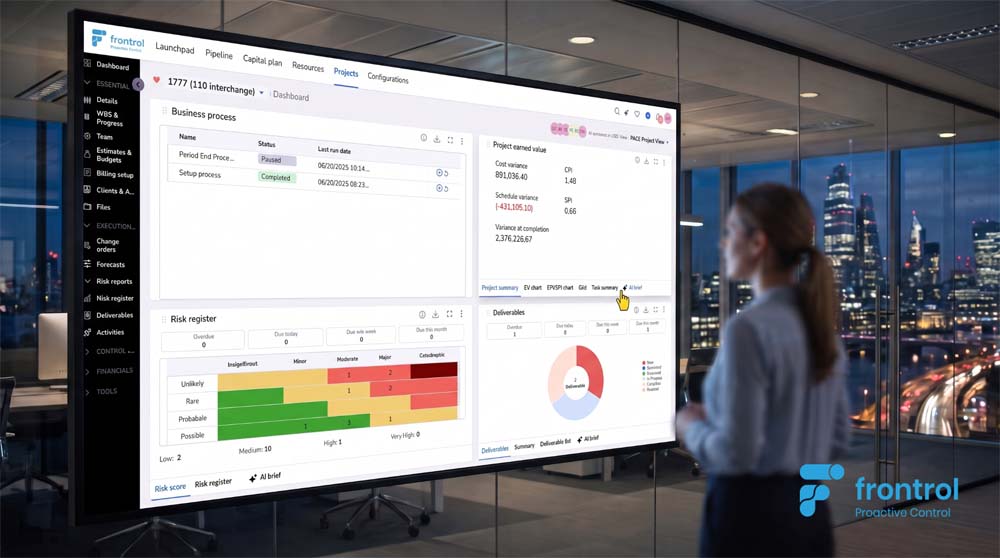
Earned Value Management is one of the most established methods for measuring integrated cost and schedule performance.
A capable platform should support key measures such as:
- Planned Value
- Earned Value
- Actual Cost
- Cost Performance Index
- Schedule Performance Index
- Estimate to Complete
- Estimate at Completion
- Cost Variance
- Schedule Variance
- To-Complete Performance Index
Together, these measures show not only how much has been spent, but how much value has been delivered for that expenditure.
For example, assume a project planned to complete $1 million of work by the reporting date. The project has spent $950,000 but completed only $800,000 of planned value.
A conventional budget report may suggest that spending is below plan. Earned Value Management reveals a different picture:
- CPI = $800,000 ÷ $950,000 = 0.84
- SPI = $800,000 ÷ $1,000,000 = 0.80
The project is earning only $0.84 of value for every dollar spent and has completed only 80% of the work planned for the period.
Even organizations that do not operate a formal EVM program should expect their project controls platform to connect baseline plans, actual costs, physical progress, and forecasts.
Without that connection, project performance metrics can quickly become historical reports rather than early-warning indicators.
4. Risk, Issue, and Change Integration
Risk, issue, and change management should not operate independently from cost and schedule control.
Buyers should evaluate whether the platform can:
- Quantify cost and schedule exposure
- Link risks to affected work packages or milestones
- Convert realized risks into issues or changes
- Track potential and approved changes
- Assess change impacts
- Update contingency requirements
- Support governance and approvals
- Reflect approved impacts in forecasts and baselines
A risk register that is disconnected from the project forecast provides only limited value.
The same applies to change management. A platform should help teams understand how a proposed or approved change affects cost, schedule, resource requirements, contractual commitments, and expected project outcomes.
5.Portfolio and Program Visibility
Project controls software should support decisions at more than one organizational level. Executives and PMO leaders need to understand performance across projects, programs, regions, clients, sectors, and business units.
A strong platform should allow users to move from a portfolio-level indicator into the underlying detail driving it.
For example, if a program is showing a deteriorating forecast, leadership should be able to identify:
- Which projects are driving the variance
- Which work packages are underperforming
- Which milestones are at risk
- Which changes remain unresolved
- Which forecasts have recently moved
- Which risks are contributing to the exposure
Portfolio and Program reporting should not require a separate manual consolidation exercise every month.
6. Enterprise Integration
Project controls software should not require organizations to replace every enterprise system already in place.
An ERP can remain the system of record for financial transactions. Primavera P6 or Microsoft Project can continue to support detailed scheduling logic. CRM, HR, document management, and contract systems may continue to perform their existing roles.
The project controls platform should provide the connective layer between them.
Buyers should evaluate integration capabilities across:
- ERP and financial systems
- Primavera P6 and Microsoft Project
- CRM platforms
- Human capital and resource systems
- Document-management systems
- Contract and legal systems
- Business intelligence platforms
- Collaboration tools such as Microsoft Teams
The goal is not to duplicate every source system. It is to bring the information needed for project execution into a unified and governed view.
7. Configurability and Governance
Enterprise organizations rarely deliver only one type of project.
A suitable platform may need to support:
- Engineering and design projects
- Construction projects
- EPC delivery
- Capital programs
- Professional services
- Fixed-price contracts
- Time-and-materials work
- Joint ventures
- Multiple currencies
- Different business units and geographies (Multi-Org hierarchies)
Buyers should determine whether the platform can accommodate different work breakdown structures, cost structures, approval processes, project types, reporting requirements, and governance models without extensive custom development.
Configuration should allow the platform to adapt to the organization while still maintaining common standards and controls.
8.Usability and Adoption
A technically capable platform provides little value if project managers and delivery teams do not use it consistently. Usability should therefore be treated as a project-controls requirement—not simply a design preference.
The evaluation should include:
- Ease of updating forecasts and progress
- Role-based screens and workflows
- Mobile and browser accessibility
- Embedded guidance and training
- Approval notifications
- Data-entry requirements
- Microsoft Teams integration
- Digital adoption support
- Reporting automation
Buyers should ask to see how an actual project manager, cost engineer, scheduler, or program leader would complete routine work.
A polished executive dashboard is useful, but it does not reveal how difficult the underlying information is to maintain.
9. AI, Traceability, and Human Oversight
AI can add significant value to project controls, but only when it operates on connected, current, and trustworthy execution data.
A chatbot added to a fragmented legacy environment will still be constrained by fragmented information.
Useful AI capabilities may include:
- Identifying emerging cost or schedule trends
- Highlighting unusual forecast movements
- Summarizing project status
- Explaining the factors behind variances
- Prioritizing risks and issues
- Identifying incomplete or inconsistent data
- Predicting potential project outcomes
- Recommending actions for review
Buyers should evaluate whether the platform supports analytical, predictive, generative, and agentic AI capabilities—and how each is governed.
Important questions include:
- What data does the AI use?
- How current is the information?
- Can users trace conclusions back to the source data?
- Does the AI respect user permissions?
- Which actions require human review and approval?
- Is the AI identifying trends or simply summarizing text?
- Can users validate the assumptions behind its conclusions?
The purpose of AI in project controls should not be to remove decision-making from experienced professionals. It should give them earlier visibility and faster access to the information needed to make better decisions.
10.Implementation, Scalability, and Total Value
Software capability is only one part of the decision. Buyers should also evaluate whether the vendor can provide a realistic implementation approach.
Important considerations include:
- Data readiness
- Integration complexity
- Project and portfolio volume
- Configuration requirements
- Migration from spreadsheets or legacy systems
- Training and adoption
- Governance design
- Phased deployment options
- Security and access controls
- Ongoing support
A phased implementation may begin with reporting and portfolio visibility before expanding into forecasting, earned value, risk, change, and broader project-execution capabilities. Organizations should also consider total cost of ownership rather than license cost alone.
The full business case may include:
- Software subscriptions
- Implementation services
- Integration development
Many platforms can show budget versus actual cost. That’s a report, not a forecast.
- Does Estimate to Complete recalculate automatically from real actuals — timesheets, approved vendor invoices — or does someone rebuild it in Excel every reporting period?
- Is there an enforced cadence for refreshing actuals, or can a forecast quietly go stale for months without anyone being required to catch it?
- Can a project controls team model a what-if scenario — a schedule slip, a change order — without putting the live, approved forecast at risk while they test it?
- If a scenario doesn’t hold up, can the forecast be rolled back instantly to the last approved baseline, or does someone have to manually reconstruct it?
Inside PACE: Estimate to Complete is calculated as Proposed Cost minus Actual Cost, and PACE enforces a mandatory refresh of actuals every two to three weeks, pulling directly from timecards and approved vendor invoices. A New Forecast Version lets teams test a what-if scenario in isolation, and Revert to Current EAC rolls back instantly to the last approved baseline if it doesn’t hold up — no manual reconstruction required.
A process without a clear owner is a process that stalls — quietly, and usually at the worst possible moment.
- Does every open item — a submittal, an RFI, a funding request, a risk — show exactly who is responsible for the next action, not just its current status?
- Are approval workflows visible in more than one place (inbox, dashboard, task list), or does progress depend on someone remembering to check a single screen?
- When an item moves to the next stage, does ownership transfer automatically, or does it require a manual handoff that can get missed?
Inside PACE: Every submittal carries an explicit “Ball in Court” — the specific person or role currently responsible for the next action — visible in a dedicated column as it moves through Register, Request, Submit, Review, and Distribute & Close. RFIs work the same way, with two lifecycle paths (creator-initiated and manager-initiated) that always land on a clear next owner. Approval requests surface through email, an in-app bell notification, and a dedicated Tools > Approvals view, so nothing depends on one person remembering to check one screen.
A number that anyone can override by hand is a number that will eventually get overridden for the wrong reasons.
- Is risk severity calculated automatically from likelihood and impact, or can it be manually overwritten?
- Is percent complete calculated from actual versus planned quantities, or is it a subjective figure someone updates once a month?
- Does financial contingency adjust automatically based on calculated risk exposure, or is it a fixed number set once at project kickoff?
Inside PACE: Risk Level in PACE is read-only, auto-calculated as Likelihood × Impact — users cannot manually override the score. Net Contingency Amount auto-updates based on that calculated Risk Level (though it can be deliberately overridden with a visible “Overridden Net Contingency” flag). On Deliverables, Percent Complete is calculated directly as Actual Quantity divided by Planned Quantity — not entered as a subjective estimate.
Engineering and capital projects are rarely delivered by one organization working in isolation.
They are multi-party environments involving some combination of owners, engineers, consultants, EPC contractors, construction managers, subcontractors, suppliers, joint venture partners, and regulators.
Each party needs information.
They do not necessarily need the same information.
A subcontractor may need visibility into specific activities, deliverables, or dependencies. A joint venture partner may need shared project cost and performance information without visibility into another organization’s internal commercial data. A client may need project status, schedule, risk, or milestone reporting without requiring access to an entire corporate environment.
If giving someone the right level of access requires an IT ticket, a custom report, a manual export, or a full enterprise license every time, collaboration quickly becomes another administrative process. Worse still, project teams begin solving the problem outside the system.
Reports are emailed.
Spreadsheets are shared.
Documents are copied into separate locations.
Multiple versions of the same information begin circulating.
A platform built for complex delivery should support controlled collaboration across organizational boundaries.
That means providing each stakeholder with the information they are entitled to see, at the appropriate level of detail, without compromising confidential commercial or enterprise information.
The question should not be: “How do we get this information out of the system and send it to them?”
It should be: “What information should this stakeholder be able to see?”
That is a very different collaboration model.
A connected environment should make it easier to give stakeholders access to the right project information without creating another parallel reporting process.
Executives and PMO leaders need to see performance across dozens or hundreds of projects — without someone spending three days building a consolidated deck first.
- Can leadership see cost, schedule, risk, and funding status across the full portfolio without a manual consolidation exercise every reporting cycle?
- Are dashboards role-specific — financial, delivery, executive — or is everyone looking at the same generic screen regardless of what they need to decide?
- Can a portfolio-level number be traced back to the specific projects and tasks actually driving it?
Inside PACE: PACE’s Portfolio Dashboard offers more than 25 configurable widget types — from Aged AR trend and Profit and Loss to Earned Value, Change Order status, and Risk Register summaries — with catalogs that differ by project class. Blended portfolios mixing capital and contract work support up to 250 projects, and every widget carries dedicated “Help” documentation explaining its source logic, so the metric behind the number is never a black box.
Inside PACE: Capital Program and Program Management (Contract) are distinct entities in PACE, each with its own approval workflow, budget model, and reporting rules — Capital Program status reports, for example, are built to exclude revenue and billing sections unless specifically configured, while Contract programs include them. Underneath both, the Authorization Model applies role-based access control down to the level of individual View/Insert/Update/Delete permissions per function, with an explicit flag for external users — the same mechanism that lets a subcontractor use a secure upload link for a Submittal without a full PACE license.
Questions to Ask During a Vendor Evaluation
Demonstrations should be based on realistic scenarios, not a sequence of preconfigured dashboards. Ask each vendor to show, live, how the platform handles the following:
- Show a funding request that exceeds available funds. Does the system block it, or only flag it after the fact?
- Try to change an approved planning level after project approval. What actually happens?
- Show how Estimate to Complete updates when new actuals arrive — automatically, or through a manual re-entry process?
- Walk a submittal or RFI through its full lifecycle. Is ownership visible at every stage, or does it depend on checking email?
- Try to edit a closed risk or a completed status report. Does the system stop you, or let it through quietly?
- Show how the platform distinguishes a capital-funded program from a client-funded contract in its dashboards and reports.
- Ask what happens when a subcontractor needs to submit a document but shouldn’t receive a full platform license.
- Ask how any AI features inside the platform respect the same user permissions as a human — and what they specifically cannot access.
How PACE Approaches This, End to End
The “Inside PACE” notes throughout this guide aren’t eight disconnected features. They’re one architectural decision, applied consistently: nothing in PACE is allowed to live as an isolated number that someone has to trust on faith. Funding rules, cost postings, forecasts, risk scores, and progress percentages are all either calculated by the system from real inputs or governed by a rule that prevents them from drifting out of alignment with reality.
That consistency is what makes the platform hold up under the two hardest tests a capital organization can apply: an audit, and a bad month. In an audit, every locked budget, closed risk, and completed report has a defensible trail showing exactly what was approved, by whom, and when. In a bad month — a schedule slip, a funding shortfall, a risk that materializes — the numbers already reflect what’s happening, because they were never allowed to go stale in the first place. That’s the difference between a platform that reports on a capital program and one that actually controls it.
Add Your Heading Text Here
Does a project controls platform replace project management software?
Not necessarily. Project management software typically supports task coordination, scheduling, and collaboration. A project controls platform adds connected funding, cost, forecasting, risk, and performance governance on top. Some platforms, including PACE, cover both; others integrate with existing scheduling tools.
Can a project controls platform integrate with our existing ERP and scheduling tools?
Yes — a capable enterprise platform should integrate with the systems already in place rather than requiring them to be replaced. PACE includes delivered integrations with Oracle E-Business Suite and Oracle Fusion Cloud for financial data, along with API-based integration for scheduling, CRM, and portfolio data, so those systems can remain systems of record while PACE provides the connected execution layer.
What’s the difference between a project controls platform and project reporting software?
Reporting software primarily displays and analyzes information after the fact. A project controls platform also governs the processes generating that information — funding approval, forecasting, ownership routing, risk scoring, and locked audit trails — so the numbers in the report are numbers the system produced, not numbers someone assembled manually.
Do we need this if we don’t run a formal capital program office?
Even organizations without a formal program office benefit from connecting approved funding, actual cost, physical progress, and forecast in one place. The scale of governance can flex — a single-project team and a multi-billion-dollar capital program don’t need identical configurations — but the underlying need for connected data doesn’t go away.
How is AI governed inside a platform like PACE?
AI features should be evaluated on the same criteria as any user: what data they can access, whether their permissions match the person using them, and whether their conclusions can be traced back to source data. Inside PACE, AI agents operate only through authorized APIs and inherit the same role-based access control as the rest of the platform — they don’t get a backdoor around it.
How long does implementation take?
It depends on integration complexity, project and portfolio volume, and how many capabilities are being rolled out at once. A phased approach — starting with portfolio visibility and reporting before expanding into forecasting, risk, and full execution workflows — is usually more realistic than a single big-bang deployment.